7 Secret & Cheating Text Messages Apps + How to Spot Them

Digital privacy features have evolved rapidly, but so has the potential for misuse. Today, secret communications are easily hidden behind encrypted platforms, vanishing messages, and disguised tools.
Whether you are a concerned parent protecting your child from online threats or trying to understand modern digital privacy risks, identifying cheating text message apps and hidden communication software is crucial. Here is everything you need to know about how these applications work and how to detect them.

What Are Secret & Cheating Text Message Apps?
Secret messaging tools—often referred to as cheating text message apps—are mobile applications specifically designed to hide private communications from plain sight.
These applications typically feature disappearing chats, end-to-end encryption, or vault-style masking interfaces. Their primary function is to prevent casual observers from viewing specific conversation logs or contacts.
From vault software disguised as ordinary calculators to secure platforms that auto-delete chat histories, these tools are widely accessible on both Android and iOS devices.
Why Are These Hidden Messaging Apps Hard to Detect?
Modern hidden messaging apps employ sophisticated tactics to avoid detection on standard mobile operating systems:
- Decoy Interfaces: Many appear on home screens as harmless tools, such as calculators, utility folders, or simple games.
- Notification Suppression: They can disable incoming push notifications or display misleading alerts (e.g., system updates).
- Auto-Destruction: Messages are programmed to vanish seconds after being read or when the app is closed.
- Password Protection: Access to secondary chat rooms or vaults requires specific PINs, gestures, or secondary passwords.
How to Detect Hidden Texting Apps with SafeMyKid

To ensure total digital safety and transparency, having an advanced monitoring solution is essential. SafeMyKid provides comprehensive device oversight to help you identify hidden apps and risky communications easily.
SafeMyKid allows parents and authorized device administrators to monitor phone activity without requiring root or jailbreak access. It tracks installed applications, text logs, location details, and active screen time across Android and iOS platforms.
Why SafeMyKid Is Effective for Identifying Hidden Messaging Apps
When searching for stealthy or encrypted communication applications, SafeMyKid offers specialized tools designed for thorough analysis:
- App Inventory Detection: Scans and logs all installed applications, helping you quickly identify disguised software, decoy calculators, or unlisted APKs.
- Comprehensive Message Tracking: Monitors incoming and outgoing logs across standard SMS and supported social platforms (such as WhatsApp and Telegram).
- Discreet Operation: Runs smoothly in the background without causing system lag or intrusive battery drain.
- Remote Dashboard: Provides real-time updates accessible securely from any desktop or mobile browser.
- Multi-OS Support: Works seamlessly across Android devices and iOS configurations.
How to Set Up SafeMyKid for Device Monitoring
Setting up SafeMyKid requires only a few simple steps to gain full visibility into phone activities and installed applications.
Setting Up SafeMyKid on Android Devices
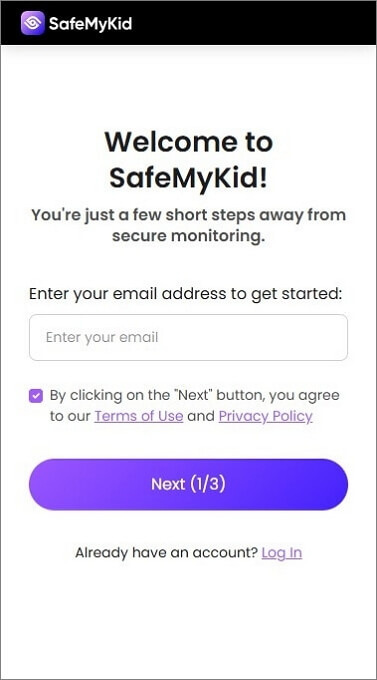
Step 1. Create an Account
Visit the official SafeMyKid website and sign up using a valid email address.
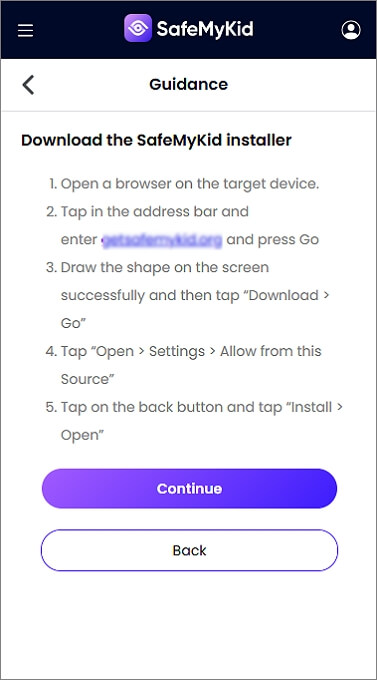
Step 2. Complete Installation on The Target Android Device
Access the Android device, download the SafeMyKid installer, and grant the necessary application permissions.
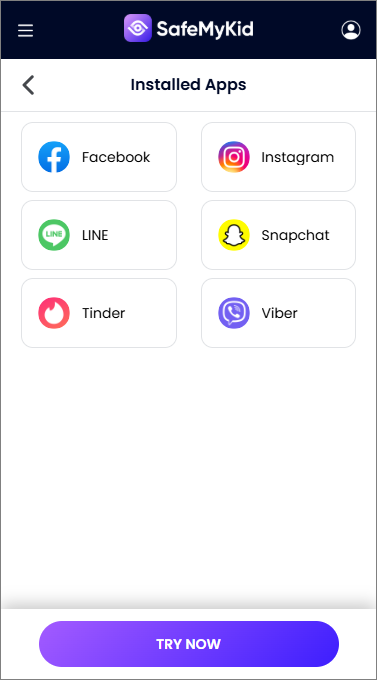
Step 3. View Reports via Dashboard
Log in to your web dashboard to review installed apps, message histories, keylogs, and activity summaries.
Setting Up SafeMyKid on iOS / iPhone Devices
Step 1. Create Your Account
Register an account on the official SafeMyKid portal.
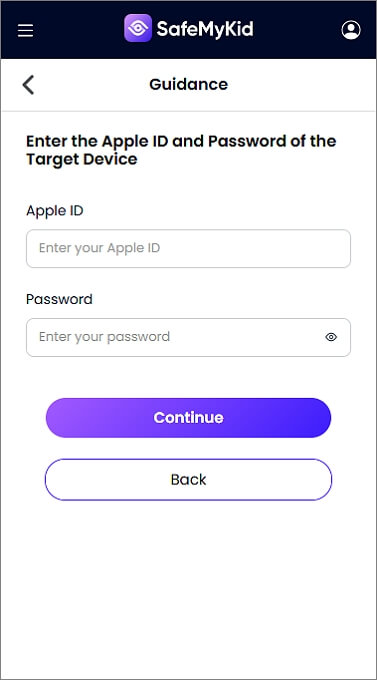
Step 2. Connect Target iCloud Details
Enter the associated Apple ID credentials into the SafeMyKid setup wizard for remote synchronization.
Step 3. Access Monitoring Logs
SafeMyKid syncs backup data to provide visibility into messaging trends, installed apps, and system logs.
You don't need any technical skills to use SafeMyKid. The interface is intuitive, and their support team offers detailed step-by-step setup help to ensure you're monitoring discreetly and effectively.
How to Manually Check a Phone for Hidden Texting Apps
If you have authorized physical access to a device, performing a manual audit can help expose hidden communication tools or secondary profiles that do not appear on the main home screen.
Key areas to inspect include:
- Decoy Applications: Look for extra calculator, file manager, or note apps with unusually high storage usage.
- Android App Drawer Settings: Check the "Hide Apps" menu within system settings to reveal hidden software icons.
- App Clones & Parallel Spaces: Inspect dual-app settings for secondary instances of WhatsApp, Messenger, or social platforms.
- Private Browsers & Vaults: Look for vault tools (e.g., Vault, Calculator Pro+) designed to hide photo galleries or message stores.
- Notification Overrides: Review app notification permissions to see if specific apps have silent alerts enabled.
While manual checks offer quick insights, sophisticated privacy apps can easily bypass casual inspection. Software solutions like SafeMyKid provide more reliable, continuous oversight without missing critical logs.
7 Most Common Secret & Hidden Messaging Apps
Some of these apps are common in everyday use, but their privacy features make them popular choices for maintaining discreet conversations. Here are some of the most common cheating text messages apps.
1. Snapchat

Snapchat is designed for quick, disappearing messages; texts, images, and videos are automatically erased after viewing.
It also alerts users if someone takes a screenshot, discouraging any attempt to save or share private content. Users can also send snaps without saving chat history and create private stories only visible to selected people.
Why secret messaging occurs here:
Disappearing content and instant alerts prevent lingering evidence, providing a high level of privacy for discreet exchanges.
2. WhatsApp

WhatsApp is one of the most popular messaging apps globally, offering end-to-end encryption, voice/video calls, message deletion, and archived chats.
It allows users to delete messages "for everyone," even after sending. Many Android phones support dual apps, making it possible to run two WhatsApp accounts on the same device.
Why secret messaging occurs here:
Dual-account features and disappearing messages allow users to separate private chats from standard messaging feeds.
3. Telegram

Telegram is known for its privacy-oriented features, including "Secret Chats" with self-destruct timers, disappearing media, and hidden private groups.
Secret Chats use end-to-end encryption and are not saved on Telegram's servers. Even if someone accesses the phone, these chats won't appear in the main chat list.
Why secret messaging occurs here:
Secret Chat mode operates outside standard server backups, preventing secondary device access or synced conversation logs.
4. Signal

Signal is often hailed as the gold standard of secure messaging. It features end-to-end encryption, disappearing messages, encrypted backups, and app-lock features.
Signal even blocks screenshots and prevents message previews from showing in the notification bar. It's also open-source and doesn't store data on its servers.
Why secret messaging occurs here:
Its strict privacy configurations block screenshot attempts and prevent notification leaks on key lock screens.
5. Viber

Viber is a lesser-known but powerful messaging app that includes end-to-end encryption, disappearing messages, and "Hidden Chats" that can be locked with a PIN.
These chats don't appear in the main message list and require a special code to access. Viber also supports voice calls, video chats, and secret media sharing.
Why secret messaging occurs here:
Conversations move to password-protected spaces that remain invisible even if the main phone interface is unlocked.
6. Facebook Messenger (Secret Conversations)

Facebook Messenger has a feature called "Secret Conversations" that uses device-level encryption.
Messages sent through this mode can only be viewed on the devices where the chat was initiated. They can also be set to disappear after a chosen time. Unlike regular Messenger chats, these don't show up on desktops or synced devices.
Why secret messaging occurs here:
Because these messages stay confined to specific mobile devices, desktop logins won't reveal ongoing hidden conversations.
7. Calculator Pro+ (and other decoy apps)
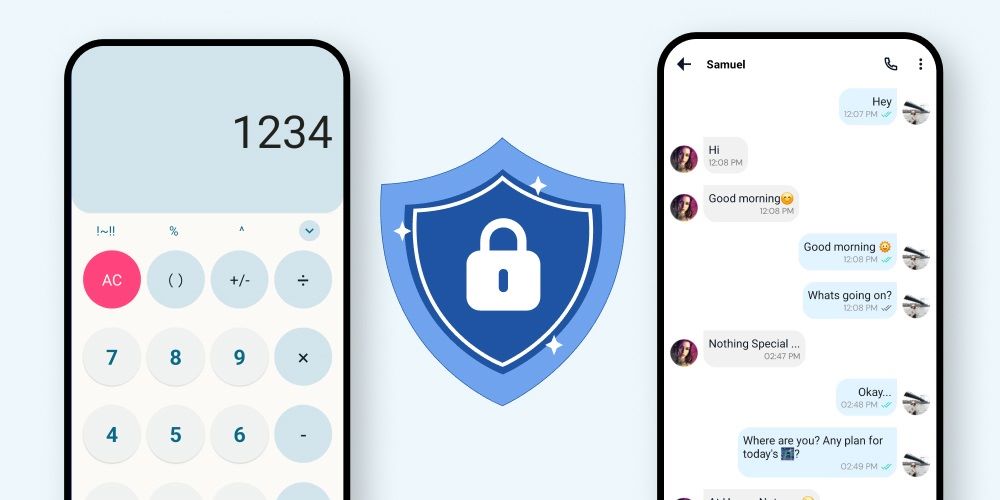
Decoy apps like Calculator Pro+ are designed to hide in plain sight. These apps look like calculators, file explorers, or even games, but once a user enters a passcode, they open a hidden vault.
Inside, users can store secret photos, messages, or even link messaging apps that don't appear in the standard app drawer.
Why secret messaging occurs here:
They blend seamlessly into ordinary app drawers, making them virtually unnoticeable to basic manual inspections.
Common Indicators of Hidden App Usage

If suspicious behavior arises, specific phone habits can indicate the presence of hidden or encrypted applications:
- They tilt or hide their screen when texting.
- Apps appear and disappear from their phone regularly.
- Presence of unauthorized dual apps or parallel spaces without standard explanations.
One or two of these may not mean much, but together they can indicate hidden digital activities or unauthorized software.
FAQs on Cheating Text Message Apps
Here are some of the most common concerns people have when dealing with cheating text message apps, along with clear answers to help you make informed decisions.
1. Can secret communications occur on regular messaging apps?
Yes, hidden messaging doesn't always require secondary platforms. Many people use regular SMS or common platforms like WhatsApp or Instagram under fake names or deleted threads.
The key is how the app is used; suspicious activity might include frequent deleting, hidden contact names, or using the archive feature.
2. Are there signs that messages are being routinely deleted?
Yes. Inconsistent conversation flows, high messaging frequency without logged histories, or active status without recent chat records can indicate manual log clearing.
3. Is it legal to monitor a mobile phone for hidden apps?
Legal regulations vary significantly by jurisdiction. Generally, monitoring a minor child's device using parental control software is fully legal. However, installing monitoring tools on an adult's personal device without their explicit knowledge or consent can violate local privacy laws. Always review local privacy guidelines before using monitoring applications.
4. Do cheating apps show up in phone usage history or screen time?
Not always. Many cheating apps hide their activity or use stealth mode to avoid appearing in usage logs. However, some hidden usage may still show up in detailed battery reports, data usage, or background app activity if you know where to look.
5. How can I tell if an app is a decoy or has hidden features?
Decoy apps often appear as tools (like calculators or folders) and require a specific passcode to reveal their true function. Check app store reviews or app settings to uncover their true purpose. Apps with excessive permissions or odd-sized file storage may be hiding something.
Conclusion
Understanding how cheating text message apps and hidden communication tools operate is the first step toward maintaining digital security and oversight. Whether through disappearing chats, app masking, or secondary spaces, modern privacy tools make secret messaging easier than ever.
By learning the warning signs and leveraging dependable monitoring solutions like SafeMyKid, you can effectively manage device safety, protect loved ones, and gain full digital peace of mind.
Legal & Compliance Disclaimer:
SafeMyKid is designed exclusively for legal parental control, child safety oversight, and monitoring of devices owned by you or used with explicit consent. Installing monitoring software on an adult’s mobile device without their prior written consent or knowledge is a violation of privacy laws in most jurisdictions and may result in severe civil and criminal penalties. Always check your local laws before using any monitoring application.



 Hot Topics