How to See My Wife’s Text Messages for Free: 7 Methods and Legal Considerations

If you're searching for how to see my wife's text messages for free, you’re not alone. Many people look for ways to understand their spouse’s communication, especially when they have concerns about trust, safety, or relationship issues.

You may be concerned about possible infidelity, family safety, or simply want to understand what options are available.
In this guide, we explain free and legitimate ways to view text message information, their limitations, and safer alternatives for protecting privacy and trust.
Why Do People Want to See Their Wife's Text Messages?
There are several legitimate reasons why someone might need to check their spouse's text messages.
One common reason is relationship concerns. Changes in behavior, communication patterns, or emotional distance may lead someone to look for answers.
Before checking any private communication, consider your reasons carefully. Is your goal to improve safety and transparency, or could the action create further trust issues in your relationship?
Many people also monitor messages for family safety concerns, especially if there are children involved and you're worried about inappropriate communications.
Another valid reason is financial protection. If you share accounts or assets, you may need to verify that she's not involved in suspicious financial discussions. Some couples in troubled marriages check messages to gather evidence before legal proceedings.
However, it's crucial to examine your motives honestly - is this about protection or control? The ethical approach is to monitor only when you have serious, substantiated concerns, not just vague suspicions.
How to See My Wife's Text Messages for Free: 7 Available Methods Explained and Their Limitations

Comparison of Ways to Review Text Message Information
Different methods have different requirements, limitations, and privacy considerations. The table below provides a quick overview before exploring each option in detail.
| Methods | Device Type | Cost | Requires Account Access | Shows Message Content? | Main Limitation |
|---|---|---|---|---|---|
| Family Monitoring Solution | iPhone & Android | Usually Paid | Yes, with proper authorization | Depends on available features | Requires setup and permission |
| iCloud Backup Review | iPhone | Free | Yes | Depends on backup settings | Only available data can be reviewed |
| Google Backup Review | Android | Free | Yes | Depends on backup settings | Backup availability varies |
| Existing Device Backups | iPhone & Android | Free | Yes | Only backed-up information | Limited by device settings |
| Shared Computer Devices | iPhone & Android | Free | Requires authorized access | Only synchronized messages | Requires existing device setup |
| Shared Mobile Account Records | Any Phone | Free/Paid | Yes | Usually No | Mostly shows usage details |
| Mobile Account Usage Records | Any Phone | Free/Paid | Yes | Usually No | Information depends on carrier |
Below are several methods to access your wife’s text messages, depending on whether she uses an iPhone or Android device. Each method has its advantages and limitations.
1. Using a Family Monitoring Solution with Proper Authorization
If you need a structured way to monitor device activity with proper authorization, SafeMyKid provides parental and family monitoring features designed to help users understand device usage responsibly.

Compared with limited backup-based methods, monitoring solutions can provide broader visibility into device activity when installed and used with appropriate permission.
Why Choose SafeMyKid for Family Device Monitoring
Depending on the device and available permissions, SafeMyKid provides access to features such as:
- Device activity insights and communication monitoring features
- Support for selected messaging and social apps depending on device compatibility
- Activity details such as timestamps and usage information
- Updated monitoring reports through the dashboard
The app works through a dashboard that helps users review device activity based on available features and permissions.
How SafeMyKid Helps Review Device Activity
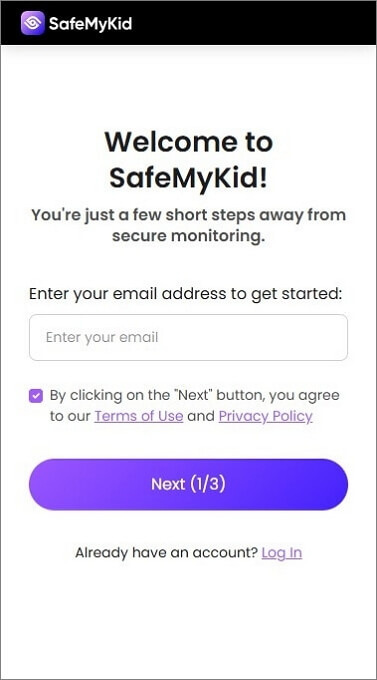
Step 1. Create Your SafeMyKid Account
Sign up using your email to access all monitoring features.
Step 2. Setup The Monitoring Solution
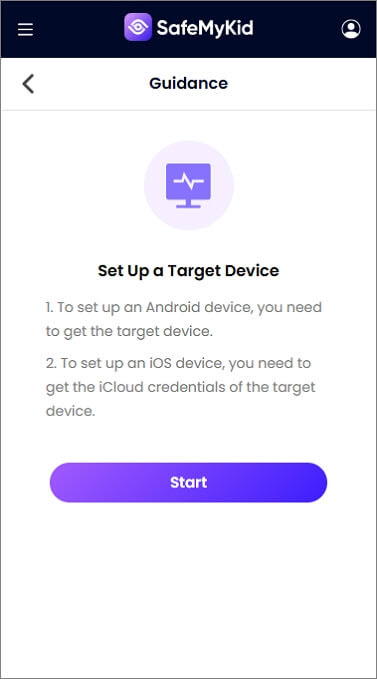
- For iOS devices: Available features may vary depending on Apple account settings, device permissions, and monitoring requirements.
- For Android devices: Download and install the SafeMyKid app on your target Android device.
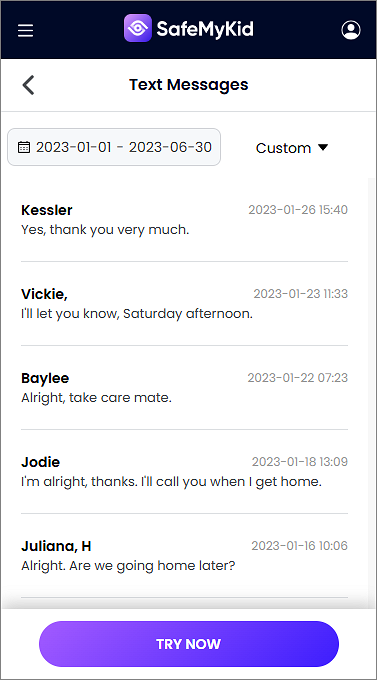
Step 3. Review Available Communication Activity Reports
Log in to your SafeMyKid dashboard from any device to review available device activity reports, communication insights, and supported monitoring features.
2. Checking Her iCloud Backup (for iPhone Users)
This method may help users review messages that are already synchronized through their own authorized Apple account settings.
Steps:
- Navigate to iCloud.com using any web browser.
- Enter her Apple ID email and password.
- Review available message data based on your Apple account settings and enabled backup features.
Pros: 
- Uses Apple's built-in backup and synchronization features.
- Available history depends on backup settings and storage availability.
- Updates depend on account synchronization settings.
- Completely transparent by the target device.
Cons: 
- Requires her Apple ID login information.
- Only displays messages if iCloud syncing is active.
3. Using Google Backup (for Android Users)
If SMS data has been backed up through an authorized Google account, users may be able to restore available information depending on device settings.
Steps:
- Access Google Drive through a browser or mobile app.
- Log in using her Google account credentials.
- Open the "Backups" section to locate SMS data.
Pros:
- Backup availability depends on Android settings and account configuration.
- Can help restore previously saved device information.
- Works with all Android versions.
- Can restore messages to a new device easily.
Cons:
- Need her Google account password.
- Doesn't include MMS or RCS messages.
4. Reviewing Existing Device Backups
Device backups can sometimes help users review available message history, depending on the device, backup settings, and account permissions. This method is mainly useful for accessing information that has already been saved through an authorized backup system.
Steps:
- Open the device backup service associated with your own authorized account.
- Check whether message data has been included in previous backups.
- Review available backup information based on the device settings and supported features.
Pros:
- Uses built-in backup features provided by device platforms.
- Does not require installing unknown third-party software.
- Can help recover information that was previously backed up.
- Works according to available device and account settings.
Cons:
- Only works if messages were included in a previous backup.
- Available data depends on device type and backup configuration.
- May not include messages from every communication app.
5. Checking Messages on a Shared Computer

If messages are already synced on a shared device with permission, users may review available conversations through that device.
Steps:
- For Mac users: Open iMessage and view all conversations
- For PC users: Visit messages.google.com while logged in
Pros:
- Allows access to messages already synchronized on the device.
- Works without the phone being nearby.
- Accesses multiple messaging platforms simultaneously.
Cons:
- Requires her to be permanently logged in.
- Won't work if two-factor authentication is enabled.
6. Checking Shared Mobile Accounts
If you share a mobile account or family plan, your carrier may provide account-level usage information. These records can help you understand general communication activity, although they usually do not include the actual content of text messages.
Steps:
- Sign in to your shared mobile carrier account.
- Review available usage details or account activity records.
- Check what information your carrier provides based on your account permissions.
Pros:
- Uses information provided directly through the mobile carrier.
- Can help review general communication patterns.
- Does not require installing additional monitoring software.
- Useful for managing shared family accounts.
Cons:
- Usually does not show the actual message content.
- Available information varies by carrier and account type.
- Requires appropriate account access permissions.
7. Reviewing Mobile Account Usage Records
Mobile carriers may provide account usage records such as phone numbers, dates, and message activity details depending on the plan and permissions.
Steps:
- Log into the carrier account online
- Navigate to message detail records
- Export complete communication logs
Pros:
- Shows messages from the past 5 years.
- Includes international text records.
- May provide additional account-level usage details.
- Tracks messages sent via WiFi calling.
Cons:
- Requires carrier account credentials.
- Some carriers charge for detailed records.
The effectiveness of these methods depends on several factors, including device settings and account access. For comprehensive monitoring, combining multiple approaches often yields the best results. Always ensure compliance with local privacy laws before proceeding.
Understanding Privacy and Ethical Considerations

Privacy laws regarding accessing text messages vary by location. Before using any monitoring method, check local regulations and make sure you have proper authorization to access the device or account.
Before attempting to access your wife's texts, you must understand the legal implications. In most jurisdictions, reading someone else's private communications without consent violates privacy laws, even between spouses.
There are exceptions if you're the account holder for the phone plan or if you're monitoring a minor child's device, but generally, secret monitoring could have legal consequences.
Ethically, this is even more complex. While you may feel justified, breaching trust can permanently damage your relationship. If discovered, it could undermine any chance of reconciliation.
Consider alternatives first - have an open conversation, seek couples counseling, or hire a licensed investigator if absolutely necessary. If you proceed with monitoring, be prepared for the emotional and relational consequences, regardless of what you find.
The most defensible approach is using transparent methods like shared family accounts where both parties consent to visibility.
Important Privacy Considerations Before Monitoring Messages
Text messages often contain personal information. Before using any monitoring method, consider privacy laws in your area and whether you have proper authorization to access the device or account.
Open communication, shared family accounts, and consent-based monitoring tools are usually safer approaches for maintaining trust while addressing concerns.
How to Handle Suspicious Communication
If you've successfully checked your wife's messages and found concerning conversations, it's crucial to handle the situation carefully. Here's how to approach the conversation:
- Stay Calm & Gather Evidence
- Avoid accusations without proof. Screenshot suspicious messages and note patterns (late-night chats, deleted conversations).
- Emotional reactions can lead to denial—stick to facts.
- Choose the Right Time
- Discuss it in private when you’re both relaxed. Avoid public settings or heated moments.
- Use "I" Statements
- Say, "I noticed these messages, and I’m feeling worried"instead of "You’re cheating!"
- This reduces defensiveness and opens dialogue.
- Listen to Her Explanation
- There might be context you’ve missed (e.g., an old friend, work-related chats).
- Watch for inconsistencies in her response.
- Decide Next Steps
- If trust is broken, suggest counseling or a break.
- If it’s a misunderstanding, agree on transparency (shared passwords, open-device policies).
Caution: If messages were accessed without proper authorization, consider the potential legal and relationship consequences before taking further action.
Final Thoughts
Finding a reliable answer to how to see my wife's text messages for free can be challenging because most methods have privacy, security, and technical limitations.
If you choose to use a monitoring solution, make sure it is used responsibly and in accordance with applicable laws and consent requirements.
Which Method Should You Choose?
| Your Situation | Recommended Approach |
|---|---|
| You want to review your own shared family device information | Use authorized backup or family monitoring options |
| You need information from an existing backup | Check available device backup records |
| You manage a shared mobile account | Review carrier-provided usage information |
| You have privacy concerns in a relationship | Consider communication and consent-based solutions first |
FAQs About Message Monitoring and Privacy
Below are common questions about message monitoring, privacy considerations, and the available options for reviewing communication information responsibly.
1. Can I recover deleted text messages legally?
Deleted messages may sometimes be recovered through authorized backups. Availability depends on device settings, account access, and whether the data was backed up before deletion.
2. Is it legal to check my wife's text messages without her permission?
In most jurisdictions, responsibly accessing someone else's private communications without consent violates privacy laws, even between spouses. There are exceptions if you own the phone/account or are monitoring a minor child's device, but legal advice is recommended.
3. What is the safest free way to review text message information?
Free methods usually have limitations and depend on existing backups, account settings, or device permissions. Monitoring solutions may provide additional features when used appropriately.
4. Can iCloud account access trigger security notifications?
Depending on Apple security settings, account access from a new device may trigger verification or security notifications.
5. Can I view WhatsApp or Signal messages using free methods?
Most free methods only work for standard SMS/MMS. To monitor encrypted apps like WhatsApp or Signal, you typically need specialized monitoring software installed on her device or access to her account on another device.



 Hot Topics